



Do you want to end our conversation?
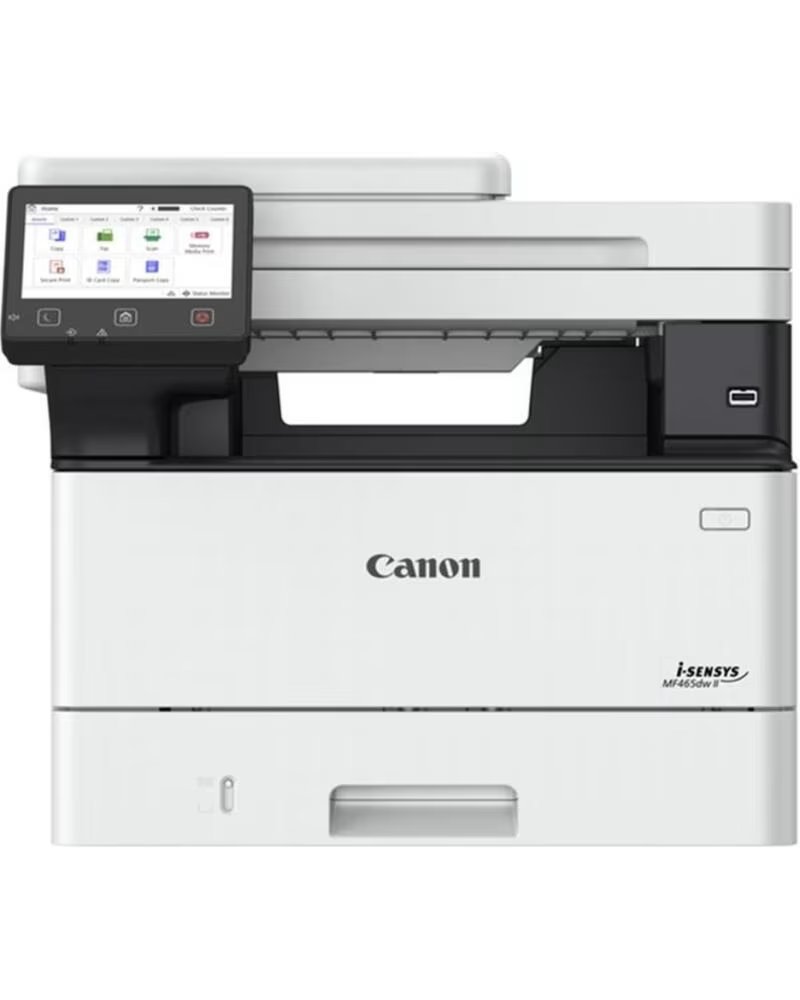
The Canon i-SENSYS MF465dw II is a compact black and white laser printer designed for offices looking for high productivity. It offers high speed in double-sided printing (up to 40 ppm) and scanning (up to 100 ipm), as well as fax capabilities to ensure professional results. Advanced security offers comprehensive data protection, while its 5-inch touchscreen makes it easy to use. Thanks to quick setup, smart scanning, workflow automation, QR code compatibility, and an eco-friendly design, it delivers reliable, efficient, and sustainable performance.
General: Equipment type: Black and white laser multifunction printer, Functions: Print, copy, scan, and fax
Printing: Technology: Monochrome laser printing, Speed: Up to 40 ppm in A4, A5 speed: Up to 65.4 ppm, Duplex speed: Up to 33.6 ipm in A4, Resolution: Up to 1200 x 1200 dpi, Warm-up time: Approx. 14 seconds, First print: Approx. 5.0 seconds, Print languages: UFRII, PCL5e, PCL6, PostScript, Fonts: 45 PCL fonts, 136 PostScript fonts, Margins: 5 mm on all sides, 10 mm on envelopes, Toner save mode: Yes, Functions: Secure print, encrypted print, print from USB and cloud, AirPrint, Mopria, and Microsoft Universal Print compatibility
Copying: Speed: Up to 40 ppm in A4, Duplex speed: Up to 33.6 ipm, First copy: Approx. 6.1 seconds, Resolution: Up to 600 x 600 dpi, Multiple copies: Up to 999 copies, Scaling: 25% to 400%, Functions: Two-sided copy, N in 1, ID and passport copy, density adjustment
Scanning: Type: Color scanner, Optical resolution: Up to 600 x 600 dpi, Enhanced resolution: Up to 9600 x 9600 dpi, Speed: Up to 100 ipm in black and white duplex, Color depth: 24 bits, Grayscale: 256 levels, Compatibility: TWAIN, WIA, ICA, Functions: Scan to email, cloud, USB, and network
Fax: Modem speed: 33.6 Kbps, Resolution: Up to 400 x 400 dpi, Memory: Up to 512 pages, Speed dials: Up to 281, Functions: Duplex fax, delayed send, memory backup
Paper Handling: Standard input: 250-sheet cassette, 100-sheet multipurpose tray, 50-sheet ADF, Optional input: Additional 550-sheet cassette, Maximum capacity: 900 sheets, Output: 150 sheets, Paper types: Plain, recycled, heavy, thin, labels, envelopes, Sizes: A4, A5, A6, B5, Legal, Letter, and custom, Supported weight: 60 to 199 g/m², Duplex printing: Automatic
Hardware: Processor: 1200 MHz, Memory: 1 GB, Storage: 4 GB, Display: 12.7 cm color touchscreen
Connectivity and Network: Interfaces: USB 2.0, Gigabit Ethernet, Wi-Fi 802.11b/g/n, Wireless Direct, Protocols: TCP/IP, LPD, IPP, IPPS, WSD, FTP, SMB, Management: SNMPv1, SNMPv3, Security: TLS 1.3, IPSec, IP/MAC filtering, IEEE 802.1X, SSL, Wi-Fi security: WPA, WPA2, WPA3
Compatible Systems: Operating systems: Windows, macOS, Linux
Dimensions and Weight: Dimensions: 420 x 460 x 375 mm, Weight: 16.3 kg
Energy Consumption: Maximum consumption: 1280 W, Operation consumption: 480 W, Standby consumption: 8 W, Sleep consumption: 0.9 W, TEC consumption: 0.32 kWh per week
Environmental Conditions: Operating temperature: 10 °C to 30 °C, Humidity: 20% to 80% non-condensing, Noise level: Up to 68 dB
Consumables: Cartridges: 070 and 070H series
The Canon i-SENSYS MF465dw II is a compact black and white laser printer designed for offices looking for high productivity. It offers high speed in double-sided printing (up to 40 ppm) and scanning (up to 100 ipm), as well as fax capabilities to ensure professional results. Advanced security offers comprehensive data protection, while its 5-inch touchscreen makes it easy to use. Thanks to quick setup, smart scanning, workflow automation, QR code compatibility, and an eco-friendly design, it delivers reliable, efficient, and sustainable performance.
General: Equipment type: Black and white laser multifunction printer, Functions: Print, copy, scan, and fax
Printing: Technology: Monochrome laser printing, Speed: Up to 40 ppm in A4, A5 speed: Up to 65.4 ppm, Duplex speed: Up to 33.6 ipm in A4, Resolution: Up to 1200 x 1200 dpi, Warm-up time: Approx. 14 seconds, First print: Approx. 5.0 seconds, Print languages: UFRII, PCL5e, PCL6, PostScript, Fonts: 45 PCL fonts, 136 PostScript fonts, Margins: 5 mm on all sides, 10 mm on envelopes, Toner save mode: Yes, Functions: Secure print, encrypted print, print from USB and cloud, AirPrint, Mopria, and Microsoft Universal Print compatibility
Copying: Speed: Up to 40 ppm in A4, Duplex speed: Up to 33.6 ipm, First copy: Approx. 6.1 seconds, Resolution: Up to 600 x 600 dpi, Multiple copies: Up to 999 copies, Scaling: 25% to 400%, Functions: Two-sided copy, N in 1, ID and passport copy, density adjustment
Scanning: Type: Color scanner, Optical resolution: Up to 600 x 600 dpi, Enhanced resolution: Up to 9600 x 9600 dpi, Speed: Up to 100 ipm in black and white duplex, Color depth: 24 bits, Grayscale: 256 levels, Compatibility: TWAIN, WIA, ICA, Functions: Scan to email, cloud, USB, and network
Fax: Modem speed: 33.6 Kbps, Resolution: Up to 400 x 400 dpi, Memory: Up to 512 pages, Speed dials: Up to 281, Functions: Duplex fax, delayed send, memory backup
Paper Handling: Standard input: 250-sheet cassette, 100-sheet multipurpose tray, 50-sheet ADF, Optional input: Additional 550-sheet cassette, Maximum capacity: 900 sheets, Output: 150 sheets, Paper types: Plain, recycled, heavy, thin, labels, envelopes, Sizes: A4, A5, A6, B5, Legal, Letter, and custom, Supported weight: 60 to 199 g/m², Duplex printing: Automatic
Hardware: Processor: 1200 MHz, Memory: 1 GB, Storage: 4 GB, Display: 12.7 cm color touchscreen
Connectivity and Network: Interfaces: USB 2.0, Gigabit Ethernet, Wi-Fi 802.11b/g/n, Wireless Direct, Protocols: TCP/IP, LPD, IPP, IPPS, WSD, FTP, SMB, Management: SNMPv1, SNMPv3, Security: TLS 1.3, IPSec, IP/MAC filtering, IEEE 802.1X, SSL, Wi-Fi security: WPA, WPA2, WPA3
Compatible Systems: Operating systems: Windows, macOS, Linux
Dimensions and Weight: Dimensions: 420 x 460 x 375 mm, Weight: 16.3 kg
Energy Consumption: Maximum consumption: 1280 W, Operation consumption: 480 W, Standby consumption: 8 W, Sleep consumption: 0.9 W, TEC consumption: 0.32 kWh per week
Environmental Conditions: Operating temperature: 10 °C to 30 °C, Humidity: 20% to 80% non-condensing, Noise level: Up to 68 dB
Consumables: Cartridges: 070 and 070H series
CANON MONOCHROME LASER MULTIFUNCTION PRINTER I-SENSYS MF465DW II WIFI FAX DUPLEX
Information about the brand representative in the EU In accordance with Regulation (EU) 2023/988 of the European Parliament and of the Council of May 10, 2023, on general product safety (GPSR), we provide the data of the brand representative in the European Union:
Canon Europa N.V. .Important: If you have any questions about your order, product, or warranty, please log in to your Aquí Mejor customer account. From there, select the corresponding order and contact the selling company (Aquí Mejor or the external seller) with whom you made the purchase.
